WordPress Plugin

Age Verification for WordPress

A real solution for WordPress sites that need compliant age verification. Not a simple "click to confirm" popup—actual verification that meets state-level regulatory requirements. Free to get started.

WordPress Age Verification That Actually Works

Most WordPress "age verification" plugins just show a popup asking users to confirm they're 18+. That doesn't meet the requirements in Texas, Louisiana, and other states now mandating actual verification for adult content.

Typical WordPress Plugins
  • "Click here to confirm you're 18+"
  • Enter your birthday (easily faked)
  • No actual verification
  • Doesn't meet Texas/Louisiana requirements
  • No regional differentiation
XY Zinc WordPress Plugin
  • Real liveness detection (proves a human is present)
  • Government ID verification when required
  • Privacy-first: no photos or PII stored
  • Meets Texas, Louisiana, and other state requirements
  • Different rules by region (skip verification where not needed)

Choose Your Plan

Start free with 100 verification credits per month. Upgrade to Pro when you need unlimited verifications and advanced features.

Free Plan
$0 /month
  • 100 verification credits/month
  • Up to 15 regions
  • In-plugin region management
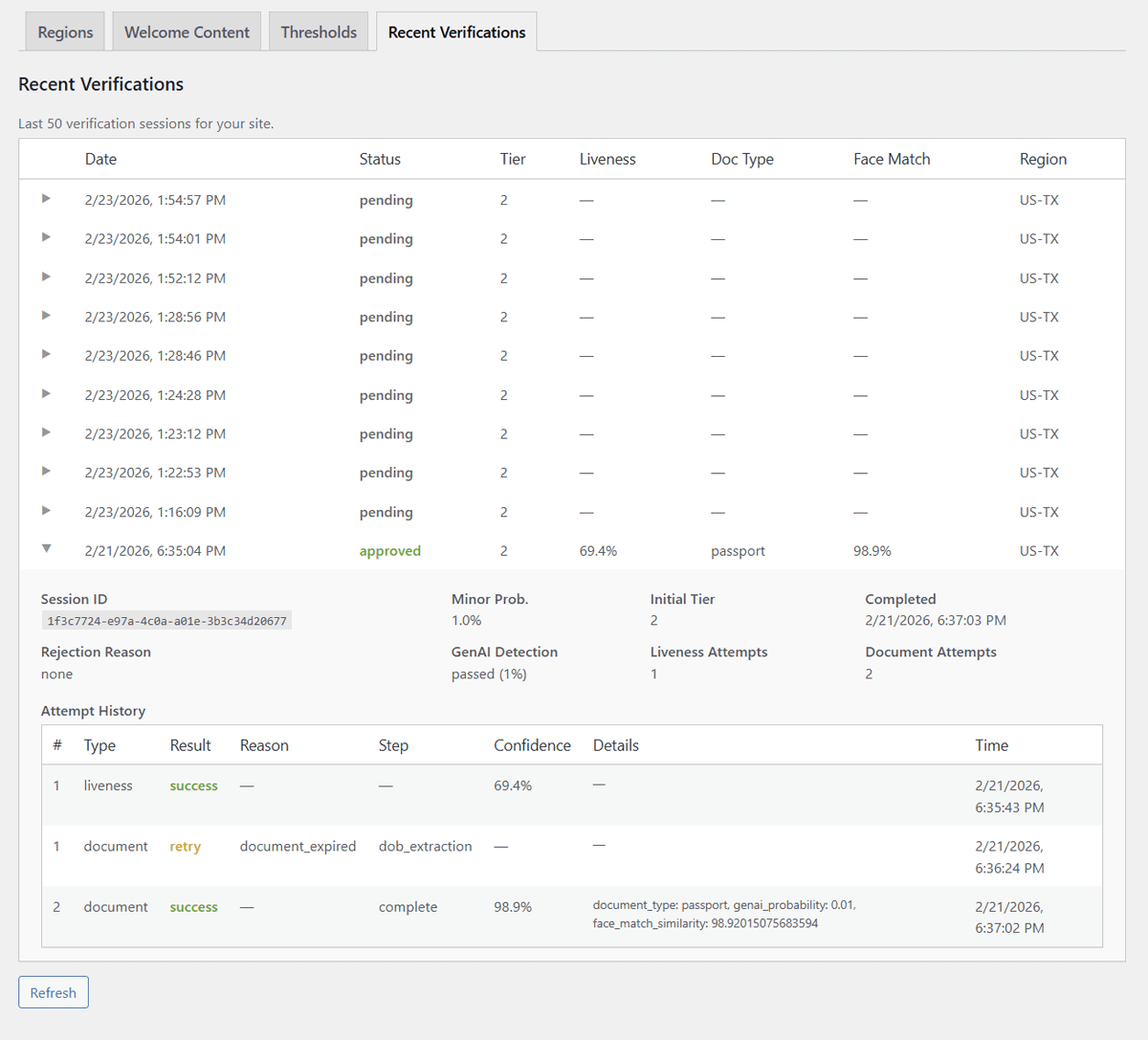
  • Verification history in WordPress
  • Test mode for simulating regions
  • Configurable fail-open or fail-closed
  • Additional credit packs — coming soon
Download Free Plugin

No credit card required

Recommended
Pro Plan
Pay per use
  • Unlimited verifications
  • Volume discounts at higher tiers
  • Full admin dashboard with 2FA
  • Custom verification hostname
  • CSS/Logo branding customization
  • Unlimited regions
  • Priority support & dedicated onboarding
Contact Us for Pro

Tier 1 from $0.05 · Tier 2 from $0.15 per verification

How It Works

The plugin has two components that work together to protect your site while keeping most pages fully cacheable.

MU-Plugin: The Gatekeeper

Runs before page cache

A must-use plugin that loads very early in WordPress—before most page caching systems. It checks the visitor's location (via Cloudflare geo headers) and verification status on every request.

  • Checks for verification cookie
  • Fetches your regional rules from XY Zinc API (cached)
  • Redirects unverified visitors to age gate page
  • Allows verified bots (Googlebot, etc.) through automatically

Plugin: The Verification UI

Handles the age gate page

The main plugin provides shortcodes for your age gate page. It creates verification sessions, displays the verification interface, and handles the return flow when users complete verification.

  • [xyz_age_verify] shortcode for age gate page
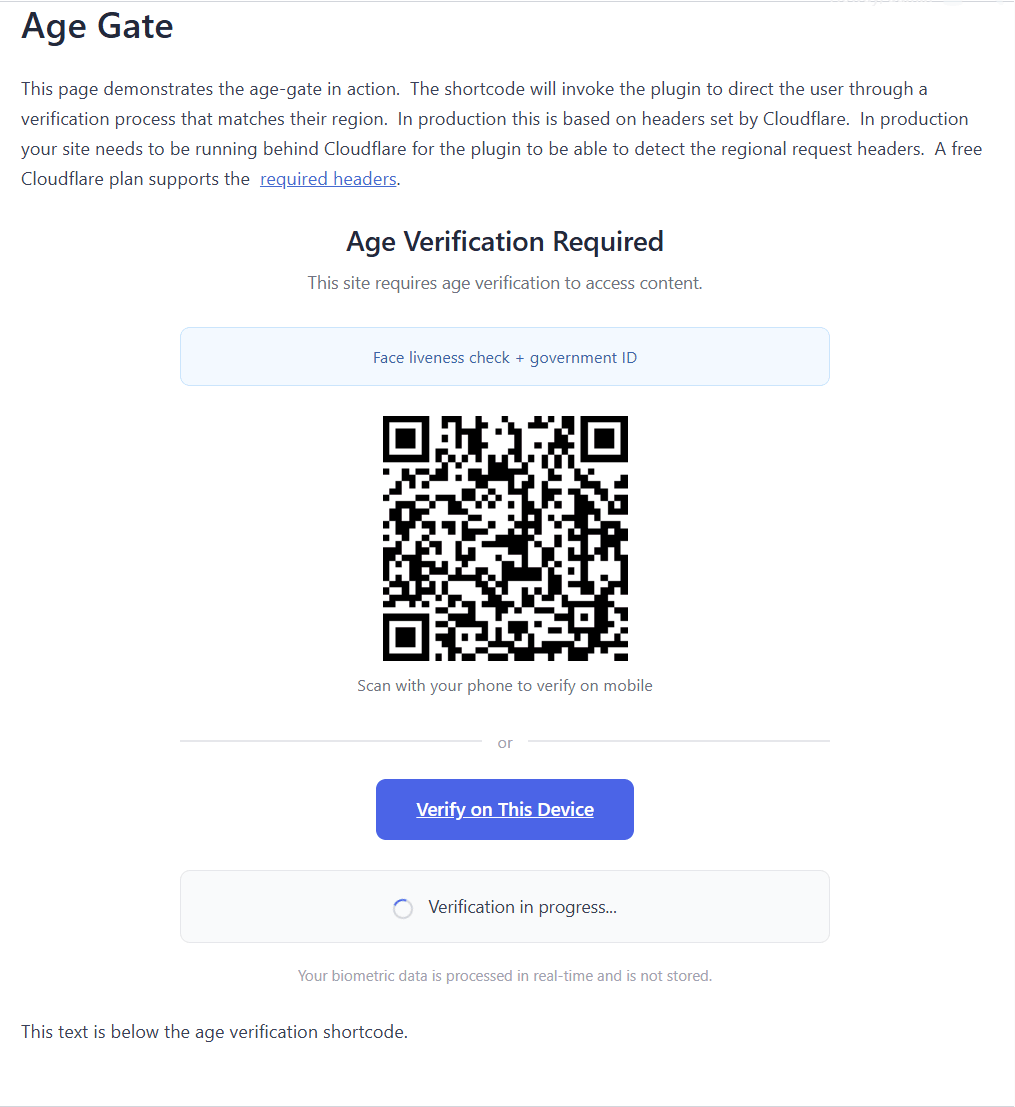
  • QR code for mobile verification
  • "Verify on this device" button
  • Validates return tokens and sets verification cookie

Verification Flow

🌍
Visitor arrives from Texas
🔍
MU-plugin checks cookie + region
📋
Redirected to /age-gate/
📱
User completes verification
Cookie set, browsing freely

See It In Action

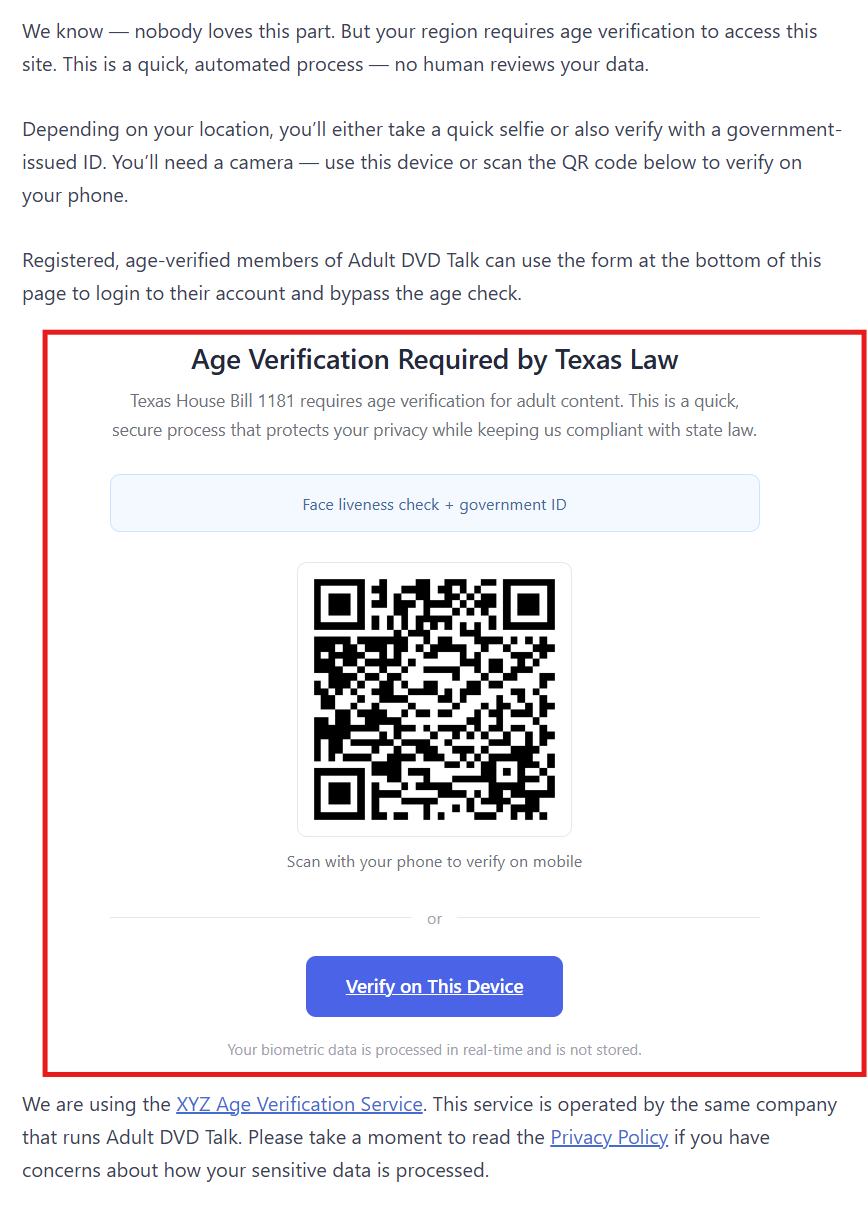
Visit our live demo site to experience the full verification flow. The demo uses test regions so you can see how different configurations work—Tier 1 (face only), Tier 2 (face + ID), and more.

Region-specific messaging (e.g., "Required by Texas Law")
Shows verification tier (face only vs. face + ID)
QR code for mobile verification from desktop
Built-in privacy reassurance messaging
Visit Live Demo

Plugin Screenshots

From registration to live verification—see what the plugin looks like at every step. Click any image to enlarge.

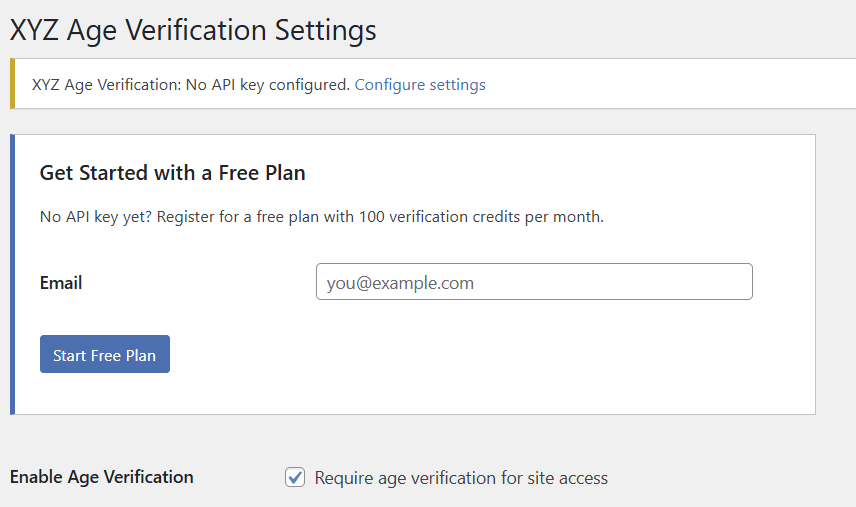
Free plan registration - enter your email

Getting started — register with your email

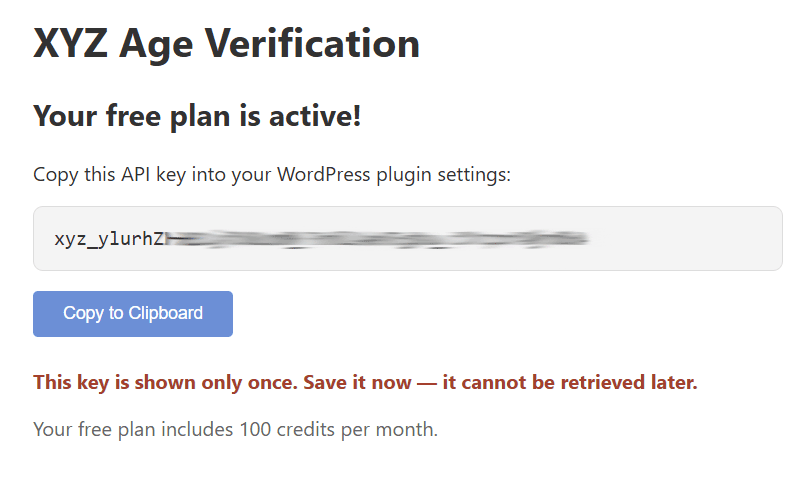
API key confirmation screen

Confirmation — your one-time API key

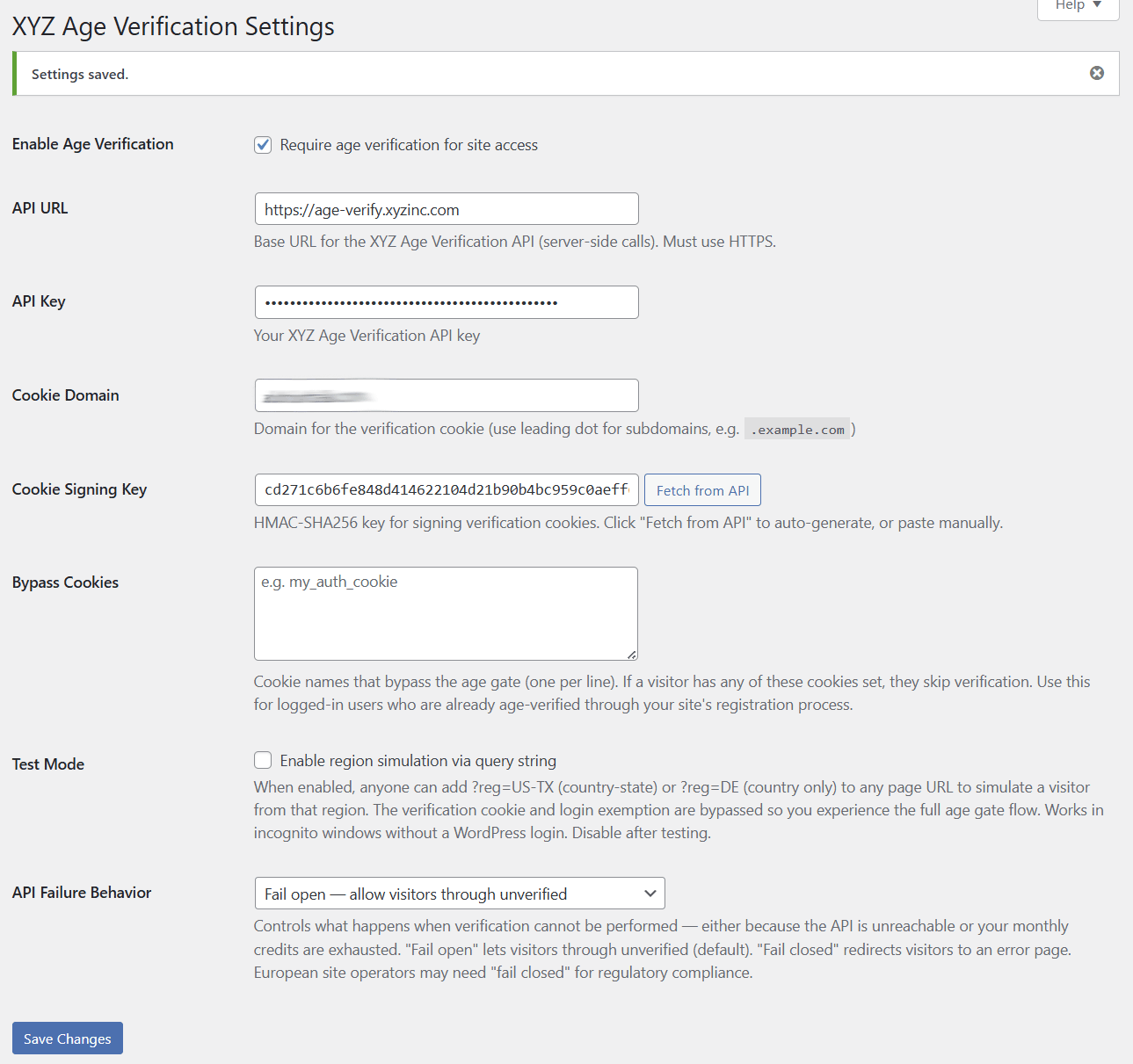
Plugin settings page fully configured

Settings — fully configured free plan

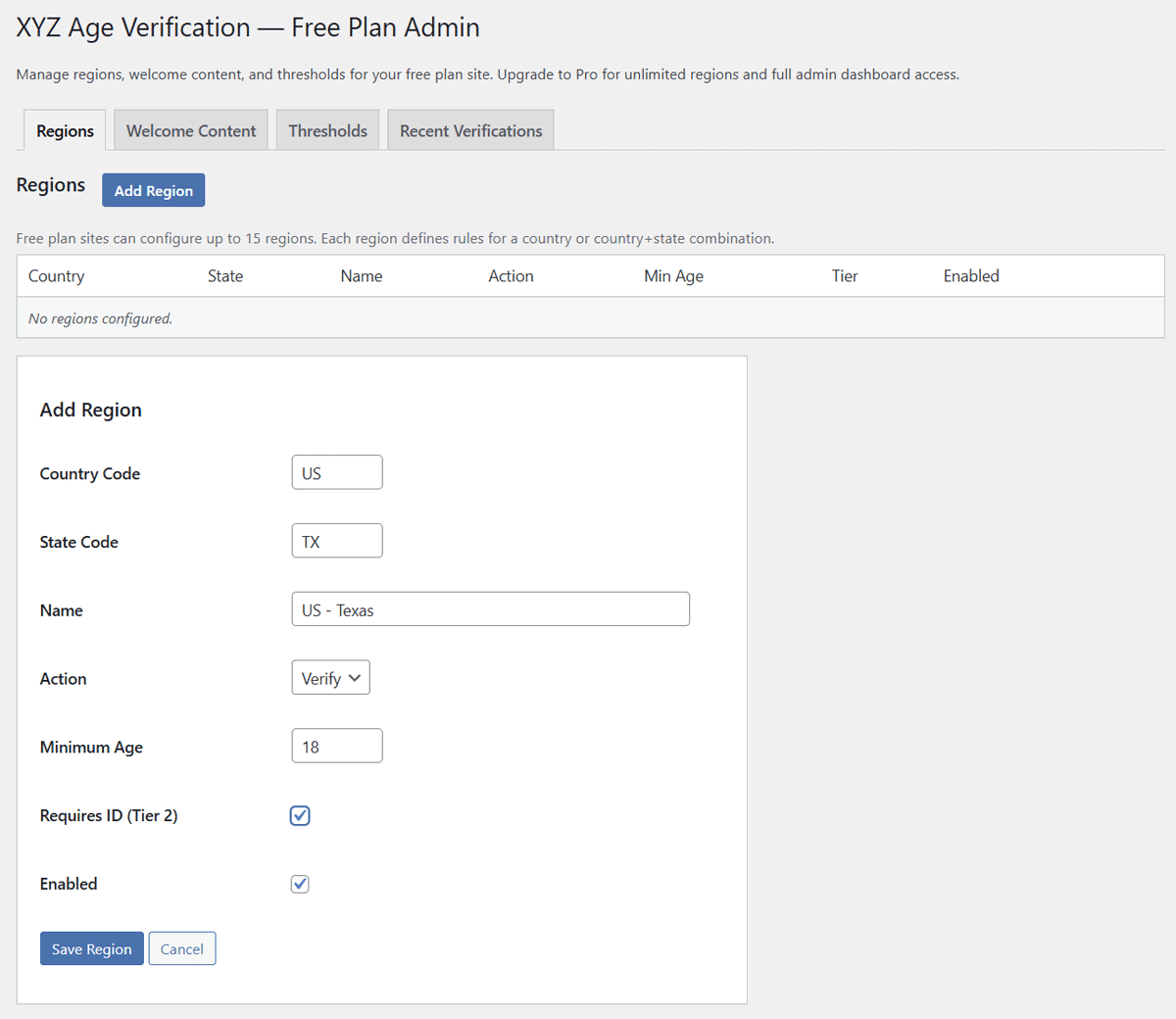
Region management - add region view

Region admin — add regions with custom age thresholds

Recent verifications with detailed history

Verification history — detailed attempt data

Age gate page with QR code on desktop

Age gate — desktop view with QR code for mobile

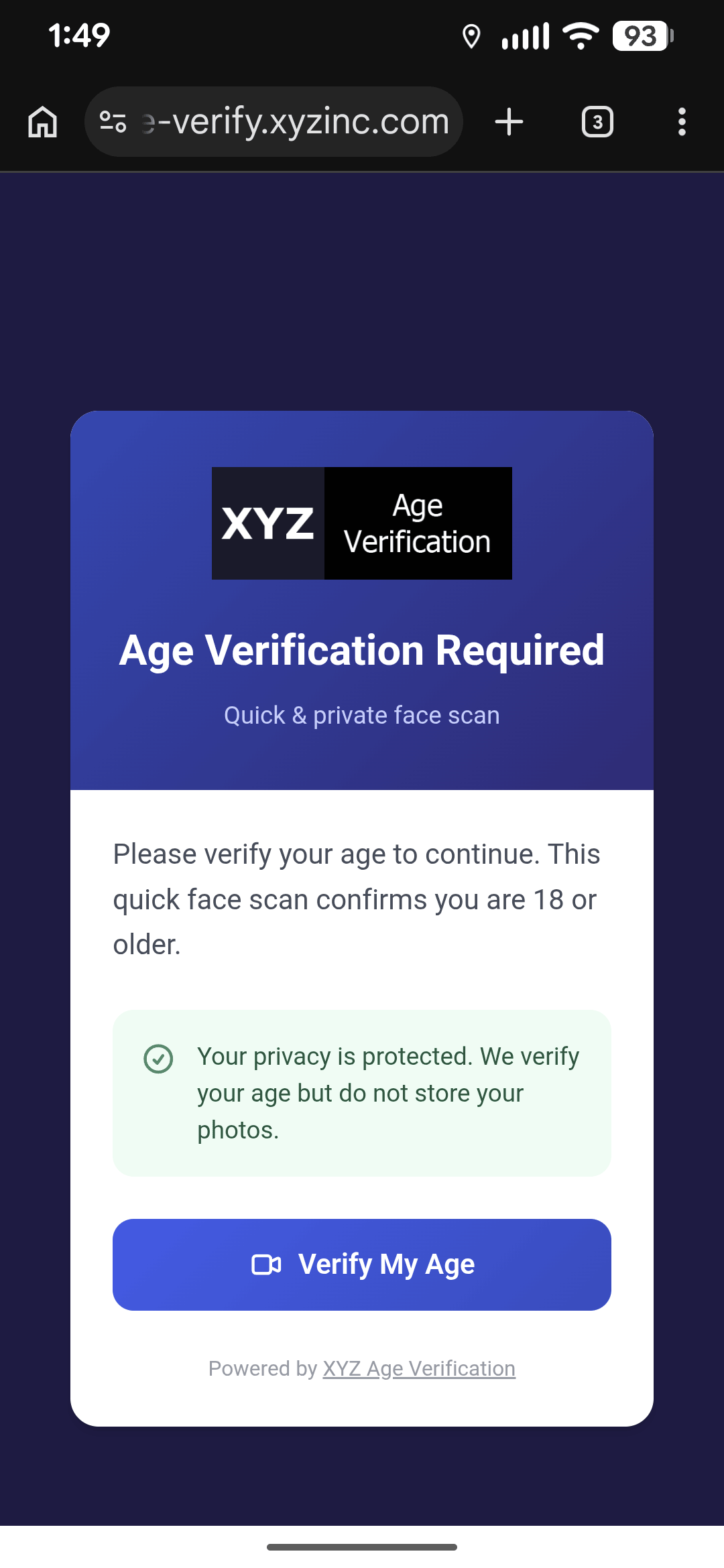
Mobile verification UI on Pixel 9

Mobile verification — what the visitor sees on their phone

Simple Setup

Installation takes about 15 minutes. The free plan includes everything you need to get started—no credit card, no sales call.

1

Upload the plugin ZIP file

Upload the plugin via Plugins → Add New → Upload Plugin in your WordPress admin. Then copy the included MU-plugin file to /wp-content/mu-plugins/.

2

Register for a free API key

In Settings → Age Verification, enter your email to register for a free plan. You'll receive a confirmation email—click the link to activate your API key. Then paste the key into the plugin settings.

3

Create your age gate page

Create a WordPress page at /age-gate/ and add the shortcode:

[xyz_age_verify]
4

Configure regions and test

Add your regions in Settings → AV Free Plan Admin. Then use test mode with ?reg=US-TX to simulate visitors from different regions without affecting real traffic.

Go live

Disable test mode and your site is protected. Visitors from age-gated regions will be redirected to your age gate page automatically.

Technical Details

Page Caching Compatibility

The MU-plugin architecture is designed to run before most caching systems. However, aggressive page caching that serves static HTML files directly from disk (bypassing PHP entirely) will require configuration.

WP Rocket: The static file serving mode is not compatible. You'll need to disable page caching or exclude age-gated pages.

The plugin has been tested to be compatible with WP Super Cache, Jetpack Boost, and W3 Total Cache. We're testing compatibility with other popular caching plugins. Contact us for guidance on your specific setup.

Cloudflare Integration

Regional detection uses Cloudflare's geo headers (CF-IPCountry and CF-Region-Code). Your site should be proxied through Cloudflare for regional rules to work.

Cloudflare's verified bot detection is also respected—search engine crawlers are automatically allowed through without verification.

Read this article in the support forum to learn more about Why the XYZ Age Verification Plugin Requires Cloudflare

Multi-Domain Cookie Sharing

The verification cookie can be shared across subdomains. Set your cookie domain to .yourdomain.com (with the leading dot) and the cookie will work on www, shop, blog, etc.

This also enables sharing verification status with non-WordPress parts of your site (Classic ASP, PHP, etc.) that share the same domain.

Requirements

  • WordPress 5.0+
  • PHP 7.4+
  • HTTPS enabled (required for secure cookies)
  • Cloudflare proxying (required for regional rules)

Need Help?

Visit our support forum for setup guides, troubleshooting articles, and community discussion. Covers everything from installation to configuring regions and test mode.

Visit Support Forum

Get Started with WordPress Age Verification

Download the free plugin and start protecting your site in minutes. 100 verification credits per month, no credit card required.